
Admin Columns & Sorting
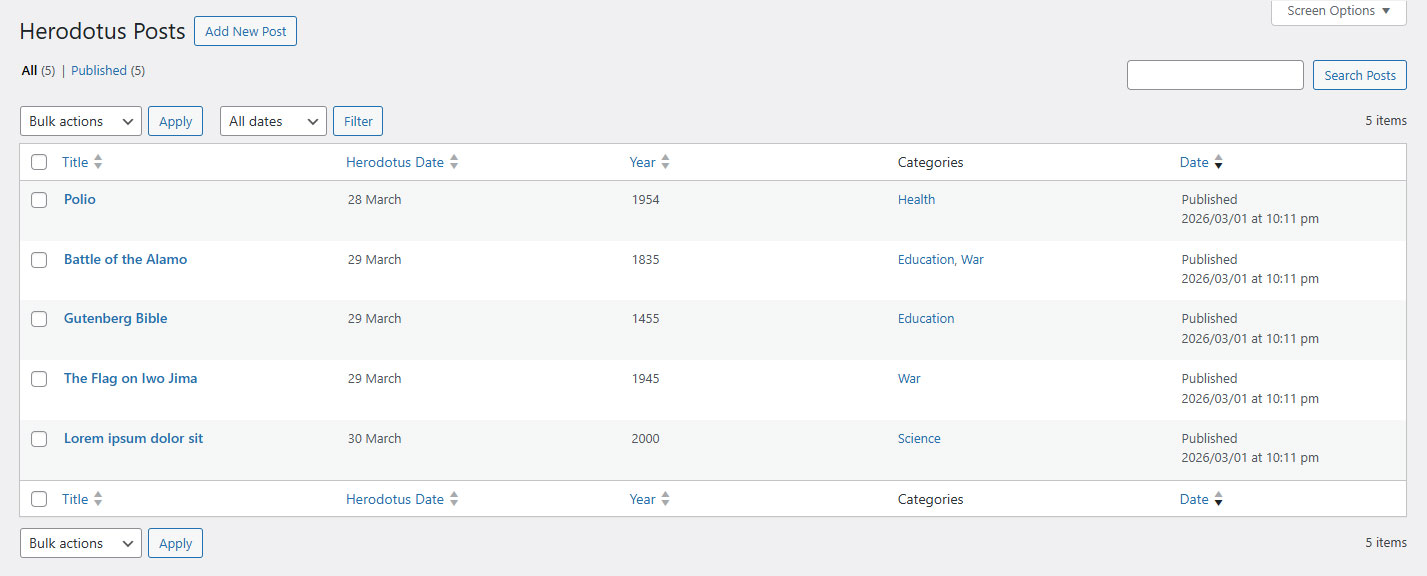
The Herodotus events list table (Herodotus - On This Day → All Posts) includes custom sortable columns.
Custom Columns
| Column | Content | Sortable |
|---|---|---|
| Title | Event title | ✅ Yes |
| Herodotus Date | Day + Month (e.g., "May 15") | ✅ Yes |
| Year | Historical year (e.g., "1969") | ✅ Yes |
| Categories | Assigned Herodotus categories | ❌ No |
Sorting Events
Click on the Herodotus Date or Year column header to sort events:
- Herodotus Date: Sorts by month first, then by day. Useful for seeing events in calendar order.
- Year: Sorts by historical year. Useful for finding the oldest or newest events.
Warning Icons
If an event is missing its date or year, the column shows a ⚠ icon instead of the date/year value. This alerts you that the event will not appear in date-based listings.
Bulk Actions
Standard WordPress bulk actions (Edit, Move to Trash) work as expected with Herodotus events.
Quick Edit
Hover an event row and choose Quick Edit. Change its day, month, year and optional BC/AD era, then click Update. Dates are prefilled. The plugin recalculates its combined date and signed year keys. Bulk Edit leaves these date fields unchanged.
Pro Filters and Markers
Pro adds month, day and category filters above the events list. They work together; the day choices follow the selected month. Priority and Upcoming markers identify those flags in the list, and Quick Edit can change them.
Historical Year Order
BC years use a negative internal sort key, so their chronological order precedes AD years. The frontend Sort Order setting is separate from clicking an admin column. Events are grouped by calendar date. Within each date, ASC puts earlier historical years first and DESC puts later years first. Titles break ties in the same direction. With Pro, Priority Events come first within their date.